Companion to GitHub tokens for agent fleets and the agent production system series.
Words I use below
- Agent — a program that writes and lands code for you, in a chat session
- Pull request (PR) — a proposed change waiting for review; on GitHub it has its own page, with a button to accept it
- Merge — accepting that proposed change so it becomes part of the main project
- GitHub App — a robot you install on a GitHub project so it can click buttons as itself — not as you; it can approve, and it can merge; people treat this robot as the “real” setup, and it is not — it is extra (this post does not tell you how to install one; if you later want that robot, read the token post)
- Lock — a program that says no when a rule is broken; the agent cannot talk it into a yes; I also call this the landing floor
- Stamp — a review that applies to one exact version of the code; “looks good” in chat is not a stamp
- Automatic tests — checks that run by themselves when you propose a change; green means they passed
Those seven words are the whole toolkit. Now the point.
People mix two ideas. One is a lock on merge. The other is a GitHub App — a robot that clicks merge for you. They are not the same thing, and treating them as the same thing is how a first-run setup becomes a scavenger hunt for a robot you did not need yet. You can keep the last click. That is enough to stop an agent from treating “please review” as a nice wish that evaporates when the session wants to say done.
The sticky note that didn’t work
Every agent setup writes some version of:
Before merging, run the review step.
That sentence is a sticky note. It is not a lock. When the agent is in a hurry, or the chat got cut short, or it just wants to say “done,” it can skip the note, and the merge still works — which is the whole problem, dressed as productivity.
Picture the last minutes of a session. Review was a line in the instructions, polite and memorable, and somehow still optional. The agent could still run the normal merge command. From the outside, GitHub looks the same — green automatic tests, same page, same calm green checkmarks that make managers feel better than they should. You only find out if you ask “did the lock run?” GitHub will not tell you a sticky note was skipped, because GitHub never met your sticky note.
If a rule matters, it can’t live only in words. It has to live in a program that says no when the rule is broken — the boring kind of no, the kind that does not negotiate with confidence language.
That program is the lock. A GitHub App can click merge after the same checks pass. It is extra. It is not the lock.
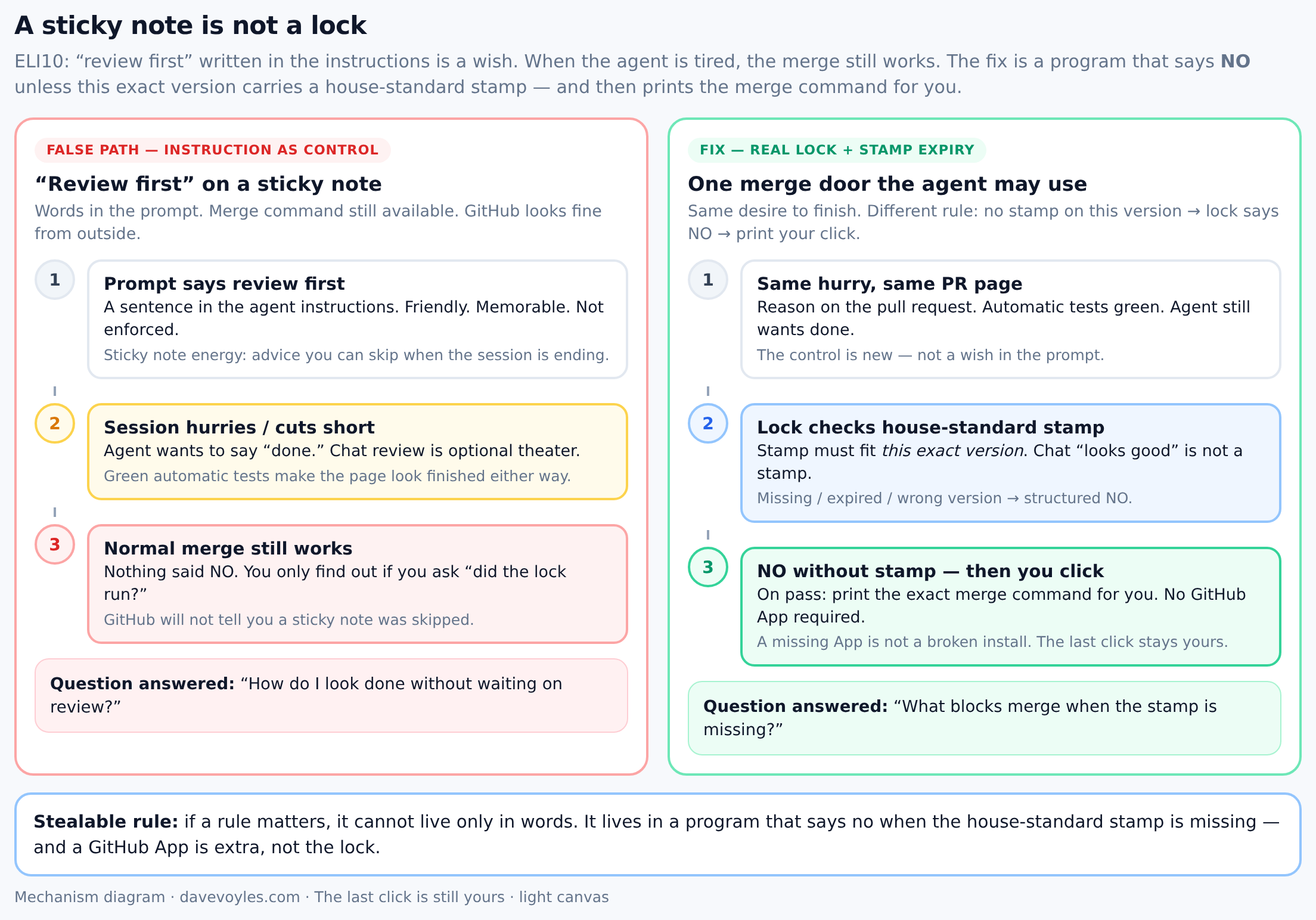
ELI10: left path trusts a sentence in the prompt; right path requires a stamp on this version, says NO when it is missing, and keeps the last click yours — with or without a GitHub App.
What “you click merge” actually checks
When you click merge, four checks run. Then the agent gets one door — the only merge path it is allowed to use — which is less glamorous than “full autonomy” and much cheaper than discovering, at 11pm, that “please review” was theater.
| Check | Why it exists |
|---|---|
| A reason on the pull request | So the change is not just a pile of diffs with no “why” |
| Automatic tests are green | The change passed the checks you already trust |
| A stamp on this exact version | “Looks good” on version A must not bless version B |
| Only one merge door | The agent does not get the normal merge command |
Example: the extra commit. It’s the end of the night. The agent wants to be done, which is a feeling I respect and still refuse to treat as a control. The pull request has a reason. Automatic tests are green. It already reviewed version A, and it said so in chat, with the confidence of someone who has already packed their laptop. Then it pushed one more tiny change — a comment, a lock file — and the latest version is now B. From the outside, a normal merge would look fine. Chat even says it reviewed the work. Chat is not a stamp. The lock looks for a stamp on this version. It does not find one. It says no. It does not pretend a GitHub App approved it. It does not ask me for a secret key. I caught it because merge is not a wish in the instructions. It’s a door the agent does not have.
When you have not installed a GitHub App:
- The lock still runs the same checks.
- It does not pretend a robot approved the change.
- It prints the exact command for you to run.
- That is success. You did not skip a setup step.
Example: no App, still a floor. There’s no robot helper. That used to feel like I forgot something, the way a missing logo on a dashboard feels like an outage to people who collect logos. I didn’t forget anything. The lock still wants a reason, green automatic tests, and a stamp on this exact version. When those are there, it still does not merge. It prints the command. I click. Same checks as when a GitHub App could click — no second “person” clicking for me, and no scavenger hunt for a robot that was never the point.
| Situation | Mode |
|---|---|
| No GitHub App installed | You click (this is the default) |
| GitHub App is installed and works | The robot can click after the same checks |
A missing GitHub App is not a broken install. It’s the path I want for a first run, and for anyone who wants a human on the last click.
Steal this rule: start with a lock the agent can’t skip; keep the last click until you want a GitHub App to click — the robot does not make the lock real.
The stamp that only fits one version
A review means: “I looked at this pile of code and I didn’t see a blocker.” That sentence is useful only if “this” still means the bytes you are about to merge, and not the bytes from twenty minutes ago plus a helpful fix.
The failure is boring, which is how most real failures arrive. Stamp on version A. Then a “just fix the comment” push makes version B. The old “looks good” is still on the page, sitting there like a receipt for a sandwich you already ate. If the lock only asks “is there a passing review somewhere on this proposed change?”, that helpful push rides an old stamp. The fix is not more hope:
- Put the stamp on the exact version, not the name of the line of work.
- New version → no stamp → say no until review runs again.
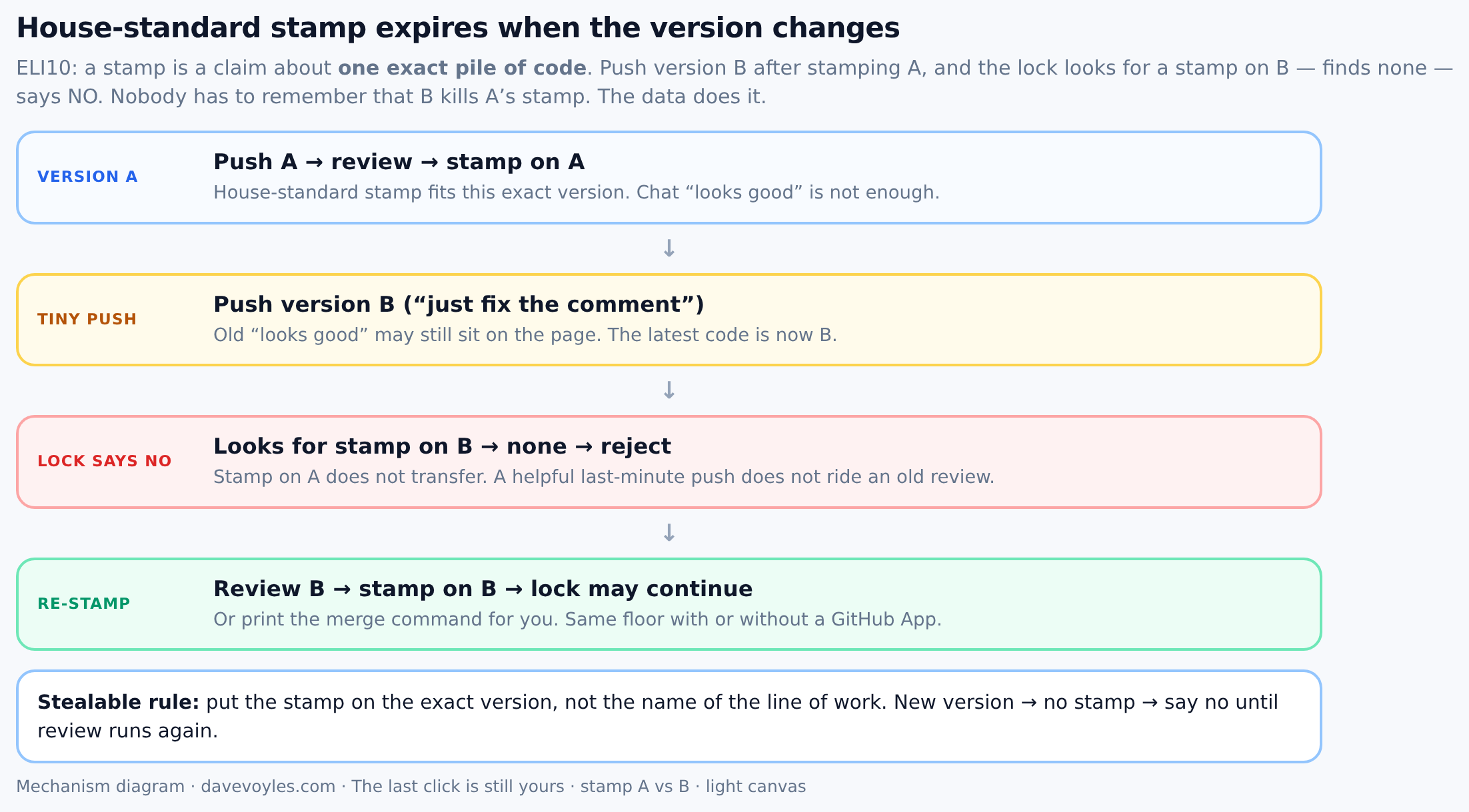
ELI10: stamp A, push B, lock rejects; nobody has to remember that B kills A’s stamp — the data does it.
Nobody has to remember that B kills A’s stamp. The data does it, which is the only kind of memory I trust after midnight.
What the agent may do
The merge door is the program. Chat is not. A session that reviewed the change and then offered that review as the merge pass is the same session wearing two hats, and I don’t treat that as a real approval any more than I treat a mirror as a second reviewer.
Allowed
- Finish the change, push, open or update the pull request as you
- Run a careful self-review
- Use the merge door
- Say clearly why it said no, then fix the gap (no reason, red tests, old stamp)
Not allowed
- Treat “I reviewed it in chat” as a merge pass
- Use the normal merge command when the setup blocks it
- Skip a new review after a last-minute change
- Demand a GitHub App before the lock is “real”
Where this sits in the series
This post is the lock without the GitHub App. The token post is what you add when you want the robot to click. Human approval is why a person still owns irreversible edges; this post is how the landing floor stays real even when the robot is missing.
| Post | Role |
|---|---|
| Eval gates | Automatic tests before you trust the change |
| Human approval | A person still hits merge |
| GitHub tokens for agent fleets | Your login vs a robot login, if you add a GitHub App |
| This post | The full lock without needing a GitHub App |
On the About picture: Eval gates and Human approval are the idea. A robot that merges is a convenience on top.
How to start (no robot needed)
The first time I had no GitHub App, the lock printed a merge command. I still had to click — and that felt like success once I stopped treating a missing robot as a half-installed system.
- The agent gets one merge door. That’s it.
- That door needs a reason + green automatic tests + a stamp on this version.
- On pass: print your merge steps. Do not merge anyway.
- On fail: name the gap. Do not ask for a secret key.
- Later — only if you want a robot to click — add your own GitHub App (token post).
What this is not
- A claim you must publish a specific script name
- A rule that you must let a robot merge
- Permission to skip automatic tests because “you still click, so it’s softer”
- A substitute for judgment on irreversible risk (What I will not automate)
Bottom line: start with a lock the agent can’t skip. Keep the last click until you want a GitHub App to click. The robot does not make the lock real. Saying no when the stamp is missing does.